How a 14-day Recovery Sprint works
In the first two weeks of your win-back campaign, we work from your booking export, your staff approve each message, and you see which clients reply, book, and come back in.
From export to first report
Set up the clinic workspace
We agree on how often clients usually return and which booking-system field records actual revenue. You name a staff approver, identify the monitored accounts you’ll send from, and confirm who handles replies and opt-outs.
Share your booking export and consent records
Export completed and upcoming appointments, cancellations, and no-shows. Include the contact details, recorded opt-outs, and evidence of consent for the channel you’ll use. Leave out treatment details and clinical notes.
Find overdue clients eligible for outreach
We check the import against your source totals. We draft messages for people past their usual return date who have no upcoming booking, have current consent for that contact address or number, and haven’t opted out or been contacted recently.
Review, approve, and send
Your named approver reviews the recipient and approves every word before anything goes out. We recheck bookings, consent, and opt-outs just before sending the approved copy from your clinic’s account. Each campaign is capped at three touches.
Reconcile replies and new bookings daily
We check the monitored accounts before each sending session, confirm what went out, and log each reply. We honour opt-outs immediately and refresh the booking export before sending so clients who’ve already booked are taken out of the queue.
Review your first weekly report
On the following Monday, we reconcile the inbox and the latest booking export and report the previous Monday through Sunday in Toronto time. In week two, we repeat the daily checks and use the next report to review what came back.
What you’ll see each week
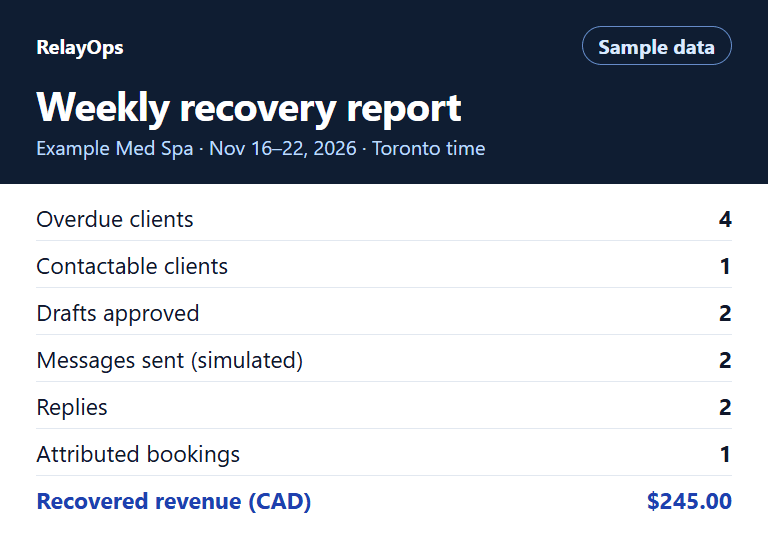
Contactable clients are counted at the weekly cutoff. A client you contacted earlier in the week may already be in the waiting period before another message. The reply total includes opt-outs.
A booking counts if it was created after a confirmed send and within 30 days. Recovered revenue is the amount actually earned from those visits once they’re completed, reported in CAD by visit date.
See if your clinic is a fit
We’ll walk through your booking export and what your team would need to launch.